Moringa - Design Documentation 1.0
after reading into distributed systems, server sent events and performance engineering i decided to solve one of my problems: the apple books app works perfectly but it doesn't support me in reading, i always wanted a fast book reading app that would still help me have fun while reading and always come back to reading. so i built moringa.
General Architecture
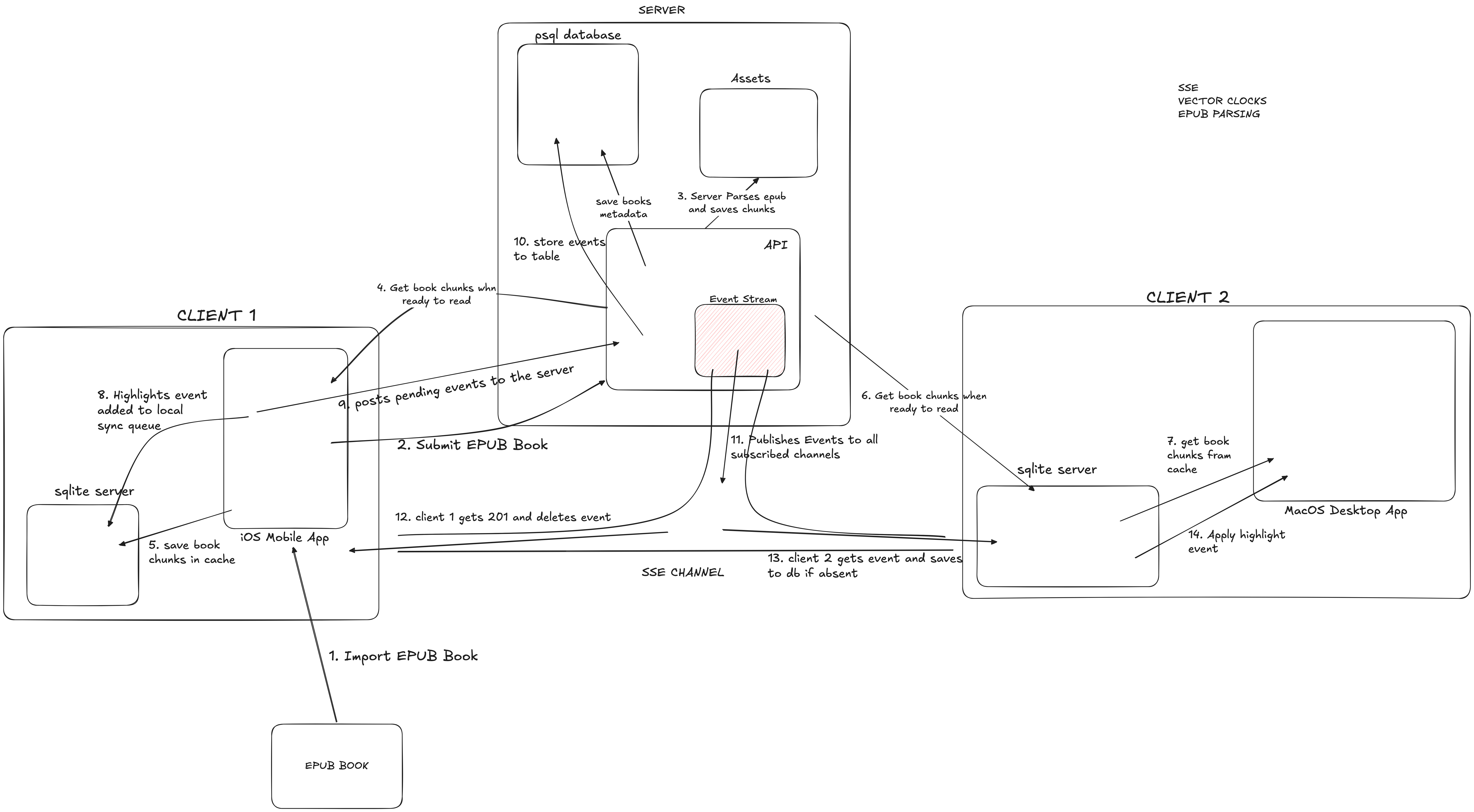
moringa was built for one person, self hosted(for now), your mobile phone and mac, and a server. general architecture includes two clients, and a server. speed was the biggest priority because a reading app should feel instant, for this each client is local first(sqlite), since sqlite on disk is ~0ms. this local first covers importing books the second time, saving highlights before syncing, etc. the server syncs live events through SSE, when a client opens a connection with the server, it simultaneously opens an SSE connection with it too.
the server keeps an event log(the authoritative record). tables for books, highlights, drafts etc are built from it and can be rebuilt.
Core Principle: Local-First
every read and write goes to a local sqlite database on the device first. the server is a sync bus. a reading and writing app must feel instant. waiting 80ms for a server round-trip on every keystroke or page turn will feel like a web app. sqlite on disk is ~0ms. the server never touches the critical path. the app works fully offline too. sync drains when connectivity returns.
Data Architecture
on each device - sqlite: every device holds a complete local copy of the user's data. book chapters cached after first download, reading position per book, highlights, personal notes, blog drafts, a unified full-text search index via fts5, a sync queue for outbound events not yet confirmed by the server, and a vector clock to track sync position.
on the server - postgresql + filesystem: an append-only event log(the source of truth for sync), materialized tables for books, highlights, and positions for query convenience, and parsed epub chapters and original uploads on the filesystem.
Sync Model
each write produces an event tagged with a device id and a sequence number. devices track what they have seen with a vector clock - { mac: 44, phone: 31 }. on reconnect, they request all events beyond their last known sequence per device.
i chose an event log over full document sync because full document sync(last write wins) would lose data when two devices edit offline simultaneously. an event log captures every fact independently. merging on reconnect means applying the unseen events in order. since this is one person, conflicts are rare, and when they occur(last-write-wins per field is acceptable).
i also skipped crdts and operational transforms. they give conflict-free merges for collaborative text editing but the engineering cost is high. for a single-user system, the conflict rate is low enough that a simpler model works. if real-time collaboration ever becomes a goal, the event log can be replaced without touching the rest of the architecture.
events are idempotent - applying one that already exists is a no-op(checked by device+seq). this means the device can safely retry on network failure.
Sync Protocol
transport is over sse for delivery(the server pushes to clients) and http post for writing events. when the app opens or comes to foreground, it opens an sse connection to the server, passing its current vector clock. the server streams every event the device hasn't seen yet, then holds the connection open and pushes new events as they arrive.
i picked sse over websockets because the sync communication is asymmetric - the server pushes to clients, clients post to the server. sse models this exactly. websockets are the right tool for bidirectional real-time(chat, collaboration). this is not that.
i also skipped polling. a 5–30 second polling interval would produce a visible lag when switching devices mid-thought. sse gives sub-second delivery with no meaningful battery cost compared to polling.
Read Paths
opening a book(warm): select from reading_state and book_chunks in sqlite, render at saved offset. latency ~0ms.
opening a book(cold - first time on this device): sqlite miss, show loading indicator, fetch chunks from server, insert all into sqlite, render chapter 1. latency 200–800ms(one-time cost, never repeated). books are immutable content. once cached, a book never hits the server again for its content. only highlights, position, and notes sync.
search: query fts5 locally - covers book_chunks, highlights, notes, blogs in one query. latency ~5ms. if local returns 0 results, fall back to postgresql full-text search on the server. latency 80–200ms.
receiving a sync update: sse event arrives, check vector clock, skip if already seen(idempotent), otherwise apply event to local sqlite, update fts5, update vector clock, re-render affected ui if visible.
Write Path: Optimistic Local-First
user types or highlights or saves → write to local sqlite immediately(~0ms, ui updates) → enqueue event in sync_queue → post to server in background. on success, mark event synced and remove from queue. on failure, retry with exponential backoff. the queue survives app restart.
the user never waits for the server. from the ui's perspective, every write is instant.
Book Import
epub import happens server-side. user uploads epub, the server parses it - extracts chapters, images, metadata - writes parsed chunks and metadata, then pushes a book_imported event to all devices via sse. devices fetch chunks on next book open(the cold load path).
epub parsing is cpu-heavy and produces a large output. doing it on-device would drain battery and require the full parsing library on both mac and phone. the server does it once. devices get the pre-parsed result.
Issues Faced: The 4GB Leak
while profiling the reader i saw a 4gb spike and initially thought i had a massive memory leak somewhere. turns out it was a security feature from webkit's js vm called gigacage - 4gb of virtual memory mapped but zero physical ram. not a leak at all. the actual problem was webkit's back-forward cache holding onto old caches from previous chapters.
so i re-implemented the reader to spawn a fresh wkwebview per chapter. that kills the process between chapters, releases the cache, no accumulation. this costs about 200ms per chapter load - not ideal, but using a single wkwebview with manual cache management was more complexity than i was ready for.
then i got worried about a different thing: moving back and forth between chapter a and chapter b would kill and open processes repeatedly. that doesn't sit well either.
i faced something similar back when i was learning jdbc in java - use one connection for the whole server runtime or open and close a connection to the db every time. the answer then was a connection pool.
same idea here: a pool of wkwebviews, about 3 of them in a ring buffer - one for the current chapter, one for the next, one for the previous. adjacent navigation becomes instant. the user never feels the process spawn. far jumps(going from chapter 2 to chapter 20) still spawn a fresh one, but that happens once a while while reading a book.
Closing Thoughts
moringa was designed to solve one specific problem, make reading feel fast and seamless across devices. local-first for instant interactions, sse for live sync, an event log for conflict-free merging, and a single-person scope to keep complexity low. it was a fun deep dive into distributed systems concepts applied to a personal tool, and i learned a ton about vector clocks, sse, and what it actually takes to make a sync protocol feel invisible.